|
Certain reports provide
you with additional choices for displaying company
information. For example:
- Change in Average
Recommendations report – you can select to show
changes for the last week or last 4 weeks.
- Change in Analyst
Recommendations – specify past
N-days.
- Recent Consensus
EPS Revisions – choose revisions during the last
1, 4, or 12 weeks for the current fiscal year (F1);
last 4, 12 weeks for the next fiscal year (F2); last 4
weeks for the completed fiscal quarter (Q0); last 4
weeks for the current fiscal quarter (Q1); or last 4
weeks for next fiscal quarter (Q2).
- Recent Analyst EPS
Revisions – choose revisions for the completed
fiscal year (F0), current fiscal year (F1), next
fiscal year (F2), completed fiscal quarter (Q0),
current fiscal quarter (Q1), or next fiscal quarter
(Q2) for the last N-days.
- Reported EPS
Surprises – specify last N-days.
- Expected Report
Date – specify next N-days.
- Predicting Next
Surprise - Most Accurate Analysts – specify next
N-days.
- Predicting Next
Surprise - Most Recent Analysts – specify next
N-days.
- Most Accurate
Consensus – specify completed fiscal year (F0),
current fiscal year (F1), next fiscal year (F2),
completed fiscal quarter (Q0), current fiscal quarter
(Q1), or next fiscal quarter (Q2).
- Most Recent
Consensus – specify completed fiscal year (F0),
current fiscal year (F1), next fiscal year (F2),
completed fiscal quarter (Q0), current fiscal quarter
(Q1), or next fiscal quarter (Q2).
- Price Change –
choose for the last: week, 4 weeks, 12 weeks, 24
weeks, or Year-to-Date (YTD).
Changing
Additional Alerts Parameters
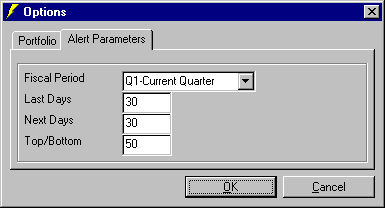
You can set a new
defaults for the additional Alert Parameters, such as
Fiscal Period, Last Days, Next Days, and Top/Bottom
number. To change Alert Parameters, follow these
steps:
1. From the Tools
menu, click Options.
2. The Options
dialog box will appear. Click the Alert
Parameters tab and enter new parameters for Fiscal
Period, Last Days, Next Days, and Top/Bottom
number.
3. Click
OK.
|