|
The following is a list
of available Zacks databases.
DBCM: Current
Market database containing quarterly and annual consensus
EPS estimates, market data, fundamental data, growth
rates, valuation ratios and supplementary
information.
AGGIND:
Aggregate Industry database containing current
fundamental data aggregated by Zacks Expanded Industry
Groups.
AGGSEC:
Aggregate Sector database containing current fundamental
data aggregated by Zacks Expanded Sector
Groups.
DBZHE: Monthly
Historical database containing data for fundamental
estimate and ratio items for entire current universe.
DBDA:
Fundamental Historical Annual Data database containing
annual income statements, balance sheet and cash flow
items; 10K data.
DBDQ:
Fundamental Historical Quarterly Data database containing
quarterly income statement and balance sheet items; 10Q
data.
ZBT_PRI: Zacks
Primary backtesting database containing 15 years of
quarterly EPS data and monthly price, return and estimate
data.
ZBT_SEC: Zacks
Secondary backtesting database containing 15 years of
quarterly EPS data and monthly price, return and estimate
data.
DBDP: Daily
Historical Prices database containing 560 days of daily
price information.
DBWP: Weekly
Historical Prices database containing 270 weeks of weekly
price data.
DBQUOTE:
Intraday (15-20 minutes delayed) prices
database.
Research Wizard
works with DBCM ticker set.
Setting Default
Database
You can specify what
database will be loaded the moment you start Research
Wizard.
To set a default
database, follow these steps:
1. From the
Tools menu, select Options.
2. At the Options
dialog box, click the Browse button.
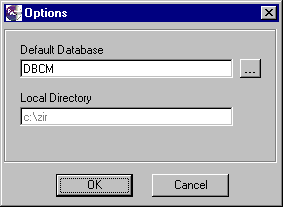
3. At the Zacks
Databases menu, select a database from the list and click
OK.
4. At the Options menu,
click OK again.
Resetting Default
Database
When in the process of
working with several databases you want quickly access
the default database, select the Reset Database command
from the File menu.
|