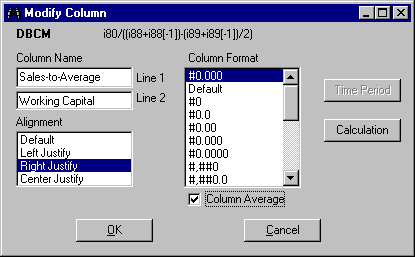
Some options on the Modify menu are
available for all types of items. These options include Column Name,
Column Average, Alignment, and Column Format. Other options become enabled when the
item used in a report has two or more data periods or is a calculated
item. These options are Time Period and Calculation. Modify Column options will depend
on the item. Column Name - used to change
the item's name. If the item's name is long, you can use two lines for
the name. Column Average - used to add
or remove item average in the report.To display the average, mark the
Column Average check box. Alignment - used to change the
item's position within the column. By default, all items are Right Justified.
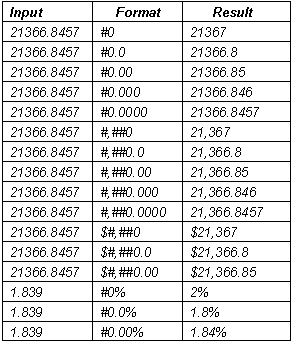
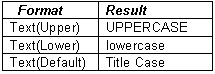
Column Format - used to change
the way numbers are displayed (the first format shown on the list is
the default format). Time Period - used to change
item's period (available for time-series items only). Calculation - used to change
the calculation for the custom item (Calculation Expression).